Your text.
Every device.
Never lost.
A fast, hand-built text editor with cross-device sync of even your unsaved buffers (Pro), local version history, and AI editing from any provider. macOS, Windows, Linux — one codebase.
See it in 70 seconds
Paste messy data, transcribe a YouTube video, translate it, compare files and share safely, all in one notepad.
Get NotepadXtreme
Pick your platform. NotepadXtreme is free to download and use — no account, no trial, no paywall.
NotepadXtreme runs on your computer
It's a desktop app for Mac, Windows and Linux. Send yourself the link and install it when you're back at your machine.
macOS
Direct download — the build Pro unlocks.
Or install with Homebrew
brew install --cask syedaqibm/tap/notepadxtremeThe App Store edition is the free tier — no AI features and no Pro extras. The download above is the full version.
NotepadXtreme on iPhone and Android — coming soon
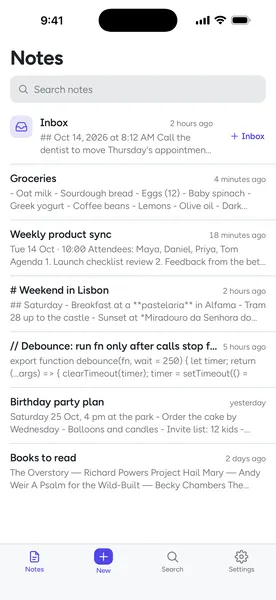
A fast, private notes app. Free, with no account.
- Notes save as you type
- Quick-capture Inbox
- Search across notes
- Find in note
- Local version history
- Markdown and code highlighting
- Dark mode
- 10 languages
Everything a serious editor has, plus five things no editor combines
Everything you expect from a serious editor — plus the features that made this worth building.
Your session follows you
With Pro, tabs, encodings, carets — and the full text of unsaved buffers — sync through any folder you already have (iCloud, Dropbox, OneDrive). No account, and nothing routed through us. Close the lid on your Mac, keep typing on your PC.
Scrub to any past version
The last 25 versions of every file — even ones you never saved — kept in compact diff storage. Drag a timeline slider to any point and restore. Like Google Docs history, for any text file, fully local. Pro keeps every version, forever.
Any model, any provider
Transform selections in plain English, build regexes from a description, explain or summarize a file. Works with Claude, OpenAI (GPT‑5.5, GPT‑6), Gemini, Grok, DeepSeek, Mistral, Groq, OpenRouter, or a local Ollama — your key, on-device. Settings → AI → Check connection tells you whether your key works, or why not.
Draw right next to your notes
A full Excalidraw canvas built in: hand-drawn shapes, arrows, text and freehand. Open a drawing in its own tab, or pop the sketchpad beside your text. Export any drawing as PNG or SVG with Pro. Works entirely offline.
Beyond find & replace
Chain sort → dedupe → case → trim as one undo step. In-app clipboard history, side-by-side tab diff, multi-caret editing, live Markdown preview, and a big-file mode that stays smooth past 100 MB.
A 100 MB log opens in under a second
Big files are read in pieces straight into the editor, so a 100 MB log opens in about 0.8 s. And when you're not working, it stays quiet: no busy CPU in the background.
Jot it down from any app
Press ⌘⇧Space (Ctrl+Shift+Space on Windows and Linux) and a Quick Note pops up over whatever you're doing, without pulling the editor to the front. Save it to your Inbox and you're back where you were.
Follow-up questions cost less
With Claude, follow-up questions about a document reuse a cached copy of it: that part costs about a tenth as much, and answers come back sooner. In the AI panel, Short and Detailed each keep their own result, and one click summarizes the document you just switched to.
Draw it right where you wrote it
A full Excalidraw canvas lives inside the editor. Sketch the diagram your notes are describing — in its own tab, or on a sketchpad beside the text — then, with Pro, export it as a PNG or SVG. No second app, no account, no internet.
- Its own tabNew Drawing from the + menu opens a canvas as a real file, with tabs, unsaved-change tracking and session restore.
- Or beside your textThe sketchpad panel docks next to the editor and stays where you left it — doodle while you write.
- Export anywhere · ProSave as PNG or SVG for slides, issues and docs. Files keep the editable
.excalidrawscene. - Entirely offlineFonts and assets ship inside the app. Nothing is uploaded, nothing is fetched, no account needed.
Reads right in any light
Full editor themes that reskin the whole app — or set it to System and it follows your OS between light and dark, live.
A modern text editor for macOS, Windows & Linux
NotepadXtreme (formerly NotepadX) is a free text editor built for people who live in plain text — developers, writers, sysadmins, and anyone who keeps a scratch file open all day. If you have been looking for a serious editor that runs natively on macOS, Windows, and Linux, this is it. It opens a 10 MB log file in under a second, handles 140+ programming languages with syntax highlighting, and never loses your work.
Most editors treat your unsaved scratch text as disposable. NotepadXtreme does the opposite. Its signature feature is session restore of unsaved buffers: quit with untitled, unsaved tabs open and they come back exactly as you left them on the next launch. Layered on top is cross-device sync (Pro) that carries those same tabs, carets, and unsaved text between your computers through any cloud folder you already use, with no account, and without your text passing through us.
Everything a serious editor needs, and four things no other editor combines
On the fundamentals, NotepadXtreme has everything a serious editor needs: tabbed editing, a non-modal find & replace with regular expressions and $1 capture groups, encoding detection and conversion (UTF-8, UTF-16, Latin-1), line-ending control (LF, CRLF, CR), a resizable folder sidebar, code folding, multi-cursor and column selection, zoom, word wrap, and a full complement of line operations. Six editor themes — including Monokai, Dracula, Nord, and Solarized — reskin the entire app, and a System theme follows your operating system between light and dark automatically.
Where it pulls ahead is the combination of four capabilities you would otherwise need four separate apps for. Local version history keeps the last 25 versions of every file — even ones you never saved — in compact diff storage (Pro keeps every version), so you can scrub a timeline slider to any past state and restore it. Bring-your-own AI lets you transform selections in plain English, generate regular expressions from a description, and summarize long files, using your own key with Anthropic Claude, OpenAI GPT, Google Gemini, xAI Grok, DeepSeek, Mistral, Groq, OpenRouter, or a fully offline local Ollama model. Power text tooling adds chainable text pipelines (sort → dedupe → trim as one undo step), an in-app clipboard history, side-by-side tab diffing, and live Markdown preview. And a big-file mode keeps typing smooth in documents past 100 MB where other editors stall.
A plain text editor — not a rich text editor — and why that matters
NotepadXtreme is deliberately a plain text editor. Unlike a rich text editor or a word processor, it never injects hidden formatting into your files: what you type is exactly what is saved, byte for byte. That makes it the right tool for source code, Markdown, configuration files, server logs, CSV exports, and quick notes that must stay portable. If you have ever pasted from a rich text editor into a terminal or a CMS and watched smart quotes break everything, you already know why writers and developers keep a plain text editor as their daily driver. You get the speed and predictability of raw text, with syntax colors, folding, and multi-cursor editing on top.
Better than an online text editor — and an AI text editor built in
Many people reach for an online text editor because there is nothing to install. The trade-off: a text editor online stops working without a connection, struggles with big files, and your text passes through someone else's server. NotepadXtreme installs in seconds, works fully offline, opens huge logs instantly, and keeps every byte on your machine — and, with Pro, syncs between devices through your own cloud folder. It is also a true AI text editor: rephrase or refactor a selection, autocomplete as you type, summarize a document, or transform text with a plain-English instruction, using any AI provider you choose. A free text editor with no ads that combines editing, history, and AI, with sync in Pro — that is what makes NotepadXtreme a serious contender for the best text editor for Mac, Windows, or Linux.
NotepadXtreme is free and ad-free, with no trial, no usage tracking, and no lock-in — your files stay on your machine and your API keys stay on your device. Optional Pro, a yearly licence, adds extras such as cross-device sync for those who want them; the editor itself stays free. Download it for your platform above and start editing in seconds.
The editor is free. Pro adds the extras.
Everything you need to write and code is free forever, with no ads, no account and no time limit. Pro unlocks the parts that produce something to share or run in the background.
Free
£0 — forever
- The full editor: tabs, split view, 140+ languages
- Regex find & replace, encodings, huge files
- Drawing canvas and sketchpad
- Session restore and recent version history
- AI rephrase, transform, explain — your own key
Happy on free? You can chip in to keep it built.
Pro
$32 a year, plus tax where applicable
₹2,499 a year
- Export sketches, drawings and flow charts as PNG or SVG
- AI diagrams: notes → diagram, diagram → notes
- Cross-device sync of tabs and unsaved buffers
- Unlimited version history
- Macros and External Tools
- Transcribe, translate and subtitle audio and video
- Compare JSON and CSV by field and row; pin sketches to lines
UPI, RuPay and other cards, net banking or wallets, in rupees. Your key arrives by email in about a minute.
Pay in USD instead Get ProCard, PayPal, Apple Pay, Google Pay and more. Your key arrives by email in about a minute.
Or pay with Ko-fiOn Ko-fi it's $33, and the key is emailed by hand, usually within a few hours.
Valid for one year on up to 3 of your own computers. No auto-renewal: buy again with the same email and the year is added to your key.
Pro applies to the download from this site, not the Mac App Store edition.
Enterprise
$25 per seat a year, from 5 seats, plus tax where applicable
- Everything in Pro, for your whole team
- One company key, one seat per person
- Each person on up to 3 computers
- Business invoice with your company's tax ID
- Priority email support
Need 50+ seats, a quote or a purchase order? Email hello@notepadx.app.
Free forever. Backed by people who love it.
The editor itself is free forever, with no ads — Pro is optional. If the free version saves you time, you can chip in to keep it built.
Support development
Every contribution funds new features and keeps the core app free for everyone.
NotepadXtreme Pro
Image export, AI diagrams, cross-device sync, unlimited history and automation. A yearly licence key with no auto-renewal — the editor itself stays free.
NotepadXtreme FAQ
Is NotepadXtreme free?
Which platforms does NotepadXtreme support?
Does NotepadXtreme work well on Mac and Linux?
How does cross-device sync work without an account?
Does NotepadXtreme need an internet connection?
Is my data private?
Which AI providers can I use?
How do I install NotepadXtreme on macOS?
.dmg above, open it, and drag NotepadXtreme to Applications. On first launch, it is signed and notarised by Apple, so it opens normally — no security prompt and no Terminal step.How do I install on Windows?
.exe installer and run it. If SmartScreen appears, click “More info” then “Run anyway.” A .msi is also provided for managed environments.How do I install on Linux?
.AppImage (make it executable and run it), or install the .deb on Debian/Ubuntu or the .rpm on Fedora/RHEL.Can NotepadXtreme open large files?
Will NotepadXtreme stay free?
How do I get help or report a bug?
What happens when my year of Pro ends?
What is a text editor?
.txt notes, source code, Markdown, and configuration files. Unlike a word processor, a text editor works with raw characters only — no fonts, no page layout — which is why developers, writers, and system administrators rely on one every day. NotepadXtreme is a free text editor for macOS, Windows, and Linux.What is a plain text editor?
What is a rich text editor?
Is Notepad a text editor?
What is a text editor for coding?
How do you open a text editor in Linux?
nano filename, vim filename, or gedit filename depending on what is installed. For a graphical editor, install NotepadXtreme for Linux: download the AppImage, make it executable (chmod +x), and run it — or install the .deb on Debian/Ubuntu or the .rpm on Fedora/RHEL, then launch it from your applications menu.Is there a free online text editor?
Where can I download a free text editor for Windows PC?
.exe installer and a .msi package for Windows 10 and 11. macOS (.dmg) and Linux (AppImage, .deb, .rpm) downloads are on the same page. It is completely free: no trial, no account, and no ads.Is there a text editor app for desktop?
Can a text editor edit text inside an image?
Can NotepadXtreme draw diagrams or sketches?
.excalidraw files, and it all works offline.What is the best free text editor for Mac?
Is there a simple text editor for Mac?
.dmg, drag it to Applications, and you are editing in seconds. It opens instantly to a blank untitled tab like classic Notepad, stays out of your way, and everything you type is kept safe automatically — even if you quit without saving.